Showing posts with label JDBC. Show all posts

Program to insert record into Database server using prepared Statement.

// Program to insert record into DB server using prepared Statement.

import java.sql.*;

class PreparedStatementExample
{
    public static void main(String[] args)throws SQLException
    {
        // registering the driver
        DriverManager.registerDriver(new oracle.jdbc.driver.OracleDriver());
        // create connection object
        Connection con = DriverManager.getConnection("jdbc:oracle:thin:@localhost:1521:xe", "system", "chaitu");
        // Create statement object
        PreparedStatement pstmt = con.prepareStatement("insert into emp values(?,?,?,?)");
        // Giving values to the positional parameters
        pstmt.setInt(1,4);
        pstmt.setString(2,"rajesh");
        pstmt.setInt(3,40000);
        pstmt.setString(4,"chennai");
        int n = pstmt.executeUpdate();
        //close the connection
        con.close();
    }
}

META DATA

The data about data is called as MetaData. It gives more information about the original data. In JDBC we have 3 metadata objects. They are:
  1. ResultSetMetaData (provides information about ResultSet object)
  2. DatabaseMetaData (provides information about Database)
  3. ParameterMetaData (provides information about Parameters [positional parameters])
    ResultSetMetaData object provides more information about ResultSet object. ResultSetMetaData gives the no.of columns available in ResultSet as well as the name of the columns available in ResultSet and their Datatypes. Let us write a sample program on ResultSetMetaData.

Program for ResultSetMetaData
Fig: Program for ResultSetMetaData


Role of Exceptions in JDBC

In JSE API, java.sql package comes under JDBC. When we observe this package, every method in this package throws an SQLException. That means the successful working of these method is based on user. In order to overcome this problem user should write error less code. Since every method throws an exception it is recommended to handle the exception instead of throwing them.

        That means instead of using throws SQLException , we should write try and catch blocks. The following is the realtime code where we handle exceptions:

Exceptions in JDBC
Fig: Realtime code of JDBC
In the above program we are declaring the Connection,Statement and ResultSet variables before the try block, because if we declare them inside try block they are invisible to finally block and gives exception. 


Ways to register a JDBC Driver

We can register a JDBC driver in more than 10 ways. But there are majorly four ways to register a JDBC Driver. They are as follows:
  1. DriverManager.registerDriver();
  2. Class.forName();
  3. predefined System property(jdbc.driver);
  4. JDBC 4.0 Auto Loading of the JDBC Driver.

Using DriverManager.registerDriver(): 

          As we know(from FirstStep towards JDBC) that DriverManager is a class in java.sql package which contains the method registerDriver(Driver). Using this method we can register the driver.

Using Class.forName():

          First let us know what is this Class.forName() and where it is present. Let us open JSE API. There we can find the following syntax in java.lang.Class:
Fig: syntax of Class.forName();
          This method takes the absolute class path as its parameter. As this method is static it is called by using its class name Class. The work of Class.forName() method is to load the Driver class (the class which provides the implementation of Driver Interface) into JVM's memory. This Driver class consists a static block, which creates the object of itself and register the driver and register the driver as soon as the class is loaded. As we know that static blocks are executed as soon as the class is loaded. Hence the code present in this static block is responsible for registering the driver. The following example shows how to register the driver using Class.forName();
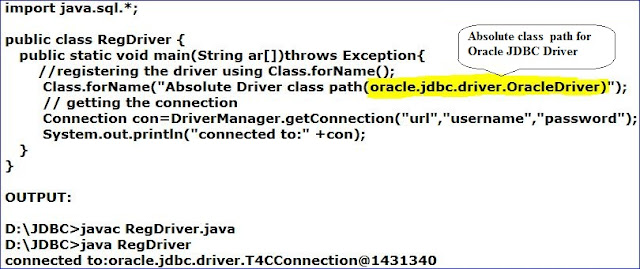
program for registering the driver using Class.forName()
Fig: program for registering the driver using Class.forName();

Using Predefined System Property-"jdbc.drivers":

           The third way to register the driver is by using the predefined system property named "jdbc.drivers". Before talking about this system property first let us know the internal code of DriverManager class. The following figure shows the internal code of DriverManager class.
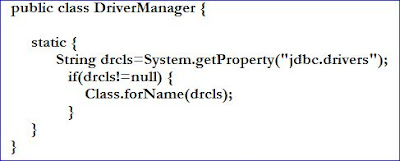
DriverManager Class
Fig: Sample Interior code of DriverManager class
         Observe the above code carefully, DriverManager class consists a static block, which takes the system property. If we provide the system property in the command line, that system property is stored in a string and that string is passed as a parameter to the Class.forName(). We already know how Class.forName() registers the driver. Hence, we can register the driver by using "jdbc.drivers" system property. We cannot change the name of system property as it is predefined. The following program explains this:
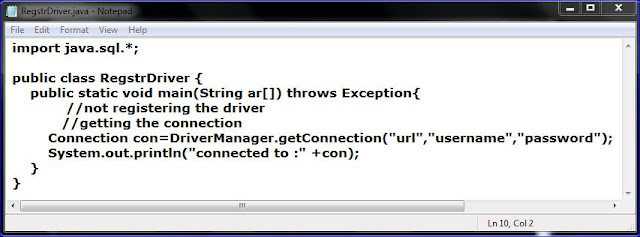
using system property
Fig: using system property

We should give the absolute Driver class name as input to the system property as follows;

Fig: output for the above program

JDBC 4.0 Auto Loading of the JDBC Driver: 
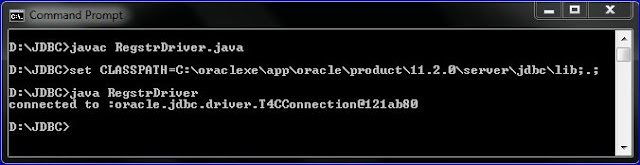
      Recently SunMicroSystems has released JDBC 4.0 specifications, in which it has specified the DriverManager class which automatically registers the driver. Oracle has implemented this specification and released "ojdbc6.jar". By setting the CLASSPATH to ojdbc6.jar, we can register the driver without writing the code. The following shows you the procedure.

program with no code to register drive
Fig: program with no code to register driver

program with no code to register drive
Fig: output

Hence, we have seen all the major types of registering the JDBC DRIVER.

Working with PreparedStatement

In JDBC, we have the following three Statement objects.
  • Statement
  • PreparedStatement
  • CallableStatement 
We have done with Statement, now let us know PreparedStatement. 

PreparedStatement:
This is similar to the Statement, but the difference is PreparedStatement improves the performance. The syntax for creating PreparedStatment   object is as follows:
PreparedStatement Object
Fig: syntax for creating PreparedStatement object.
This prepareStatement(String SQL) is present in Connection Interface. So, it should be called with Connection class object(object of a class which implements Connection Interface). This method takes the SQL query as a parameter, and it returns a PreparedStatement object. The following program shows how to use work with PreparedStatement. 
PreparedStatement example
Fig: PreparedStatement example
In the above program we are sending the query to the database using PreparedStatement. In the query you can see the POSITIONAL PARAMETERS, which represents the columns in the emp table. We can give values for those columns using the setXXX(xxx represents the datatypes) methods.                                                                                                                                                           


    Communicating with DataBase Sever

    Up to now we have seen how to register the driver and how to establish the connection with DB server.  Now let us see how to communicate with the database using java application. We can send the query to the database using the Statement object. Let us see how to create this object. Follow the below steps.


    Goto JSE API - java.sql package - Connection Interface - Method Summary - createStatement(). The following figure shows the method. 

    createStatement() method in JSE API
    Fig 1: createStatement() method in JSE API

    In the above figure, createStatement() method returns a Statement class object. The syntax for the method is as follows:
    • Statement stmt=con.createStatement();   
    By using the above statement we can just create a Statement object. After creating the statement object we should send the query to the database. This can be done by the following two methods, which are present in Statement Interface. The following figure shows the two methods in JSE API.

    Methods to send queries to Database
    Fig 2: Methods to send queries to Database
    Generally java have divided the SQL statements into two types, they are:
    1. select statements (SELECT * from Tab_name;)
    2. non- select statements (other than SELECT like INSERT, UPDATE, CREATE etc,,,)
    To send the non-select queries to the database we use executeUpdate(query) method. Since these methods are present in the Statement Interface, they are called by using Statement class object. The syntax for this method is as follows:
    •  stmt . executeUpdate(SQL query);
    Let us discuss executeQuery() method later. The following figure shows the java code for creating Statement object to send SQL queries to the database. 

    Fig 3: program to Insert records into database.

    Just observe the  executeUpdate() method in Fig 2. The return type of this method is int. That means this method returns the no.of records inserted or deleted or created etc..., as an integer. 

     Now let us discuss about executeQuery() method. This method is used to send the select queries to the database. The following is the syntax of the executeQuery();
    • stmt . executeQuery(SQL query);
     This method is used to retrieve the data from the database. This method returns the ResultSet object. The retrieved data is stored in the ResultSet object. To retrieve the data from the database we uses SELECT query. To send the select query to the database, first the Java Application is sends the query to the JDBC driver, it is the responsibility of the JDBC driver to send the query to the database server.Now, DBServer returns the ResultSet object to the JDBC driver, This ResultSet object is sent to the Java application by the driver.The following figure shows the process of retrieving the data from the database.
    Process of retrieving data form database.
    Fig 4: Process of retrieving data form database.
    In the above figure we are frequently exposed to a word ResultSet Object. This is the object that contains the retrieved data, but when we print this ResultSet object, we cannot see the retrieved data. The following program shows this.
    Program to retrieve records from DBserver
    Fig 5: Program to retrieve records from DBserver.
     The result of the above program is as follows.

    Program to retrieve records from DBserver
    Fig 6: ResultSet object as Output.
    We got the ResultSet object, but we want the records presented in that. This ResultSet object is associated with a ResultSet pointer which initially points to the zeroth record. The following figure shows the ResultSet pointer.

    Structure of ResultSet object
    Fig 7: shows ResultSet pointer, pointing to zeroth record.
    To move this pointer to the next record we should use a method next(). This method returns a boolean value. The following is the syntax.

    Next method in Result Set
    Fig 8: next() method syntax.
    The following figure shows the program to extract the data from ResultSet object. 

    program to extract data from rs object
    Fig 9: program to extract data from rs object


    Now let us try to execute this non-select query using executeQuery() method. The following figure shows the program:

    executing Non-Select query using executeQuery().
    Fig 10: executing Non-Select query using executeQuery().
    The above program executes with no error, and even it inserts the records.


    Downloading & Installing of Oracle XE DataBase Server

    Download:
           In order to work with database server we need database software. Many companies provide DataBase server software, we can download any one. Now let us see how to download and install Oracle Database. This Oracle Database software is of two types:
    • Oracle Database Enterprize Edition
    • Oracle Database Xpress Edition
    Enterprize Edition may cost some hundreds of dollars, where as Xpress Edition is free of cost. We can download the Xpress Edition from the following link.
    Go to the above link, just accept the license agreement and click on windows version. 
    Installation: 
               Hope you all know how to install the software into your pc. Just go to the setup file and double click on it. In the process of installation it asks for username and password. You can give anything,but you should make a note of  this username and password, to use in programming.
           After downloading, to work with the database we need an url. This url consists of mainly three things, they are:
    1. IP address
    2. Port Number
    3. Service Name
    When we use Enterprize Edition we need IP address of the server system to communicate with it. But here our own pc is acting as server system, so the IP address is "localhost" or 127.0.0.1(this is the default IP address of every pc). In Enterprize Edition the port number and Service name can be any thing, but here in Xpress Edition the port number is "1521" and the service name is "xe". Hence, the url of Oracle database 11g Xpress Edition is as follows:
    •  jdbc:oracle:thin:@localhost:1521:xe 
    Note: We are going to use the above url and username & password in getConnection() method of our JDBC programming


    Establishing the connection with DataBase Server

    In order to establish a connection with DB server, first we need to know, which class is used to establish the connection. DriverManager is the class which contains the method named getConnection(). The following figure shows the syntax for this method. 
    Syntax of getConneciton() method
    Fig: method in DriverManager class that connects DBServer
          In the above diagram, observe the third syntax, it contains three parameters and it returns a Connection class object. Connection is an interface, but the class which implements this Connection interface is called as Connection class, the object of which this method returns. To store this object we should create a reference variable as follows. 
    • Connection con=DriverManager.getConnection("url ", " usr_name" , "psswrd" );
    In the above syntax, since getConnection() is a static method we are calling it using its class name. Coming to the parameters, it has three parameters. The following program shows, how to connect with database.

    program to establish connection with DBserver
    Fig: program to establish connection with DBserver
      

    First step towards JDBC Programming

    I recommend to read JDBC introduction before reading this post..

    Before moving to the programming, let us first know what are the important Classes and Interfaces in JDBC API. It contains of two important packages. They are: 
    1. java.sql 
    2. javax.sql
    The following figure shows the important Classes and Interfaces in these two packages.

    JDBC classes and Interfaces
    Fig: Important Classes and Interfaces JDBC
     Any JDBC program must perform the following five steps:
    1. Register the JDBC Driver.
    2. Establish the connection with DataBase Server.
    3. Create a Statement object to send SQL queries to DataBase Server.
    4. Send the query's to DataBase with the help of Statement object.
    5. Close the connection with DataBase Server.
             To register with JDBC Driver we use a method named "registerDriver". This method is present inside "DriverManager" Class. The following is the syntax for registering the Driver.
    • static void registerDriver(Driver);
      This method is a static method which returns no value. The parameter to be passed to this method is the object of Driver Class. But Driver is an Interface(see above figure), for which we cannot create an object. 
            In JDBC Driver software there will be classes which implements all the interfaces in JDBC API. In such classes, The class which implemented Driver interface is called as Driver Class. Hence, we are going to use the object of this class as a parameter to 'registerDriver' method.
    Now let us write a small program which registers the JDBC Driver:
    Registering JDBC driver
    Fig: register the JDBC Driver.

    JDBC Introduction

    JDBC is an acronym Java Data Base Connectivity. JDBC helps us to connect to the database and execute SQL statements against the database. First let us know the basics of JDBC. Why we are using Java instead of other languages like C language.

    Can't we access the database using the C program?

              Yes, we can access the database using the C program. In-order to work with Data Base we need a database server software. When we download this software, it consists of two software's. They are 1) Database Server Software & 2) Database Client Software. When we install the software  these two softwares get installed into our computer. Every Database server uses its own protocol. For example, Oracle DB server uses 'thin' protocol for its database access. These protocols are not public, so we are not aware of that protocols. Without knowing the protocols one cannot communicate with DB server. To resolve this problem Oracle has released a set of functions called OCI functions(Oracle Call Interface functions). These functions are written in C language. The internal code of these functions communicate with DB server, even if we are not aware of protocol. Originally they are called as CI funcitons, but since they are developed by oracle, they are named as OCI. Not only Oracle, many other companies also released CI functions(for example MySQL as MCI functions, Sybase as SCI functions etc..,). These CI functions are also called as 'DB server Native Functions'. The following shows the architecture of the C program to communicate with Database.
    jdbc architecture
    fig: Architecture of C program to communicate with DB.
    Well now let us assume that we have developed a C program that communicate with Oracle DB server. Note that this program can communicate only with Oracle DB server. It is not able to communicate with MySQL DB server. The reason why this program cannot communicate with other DB servers is, every DB server uses their own protocol and CI functions which are different form the functions we used in the program.

    Note: The disadvantage with C program is, at a time it can communicate with only one DB server.

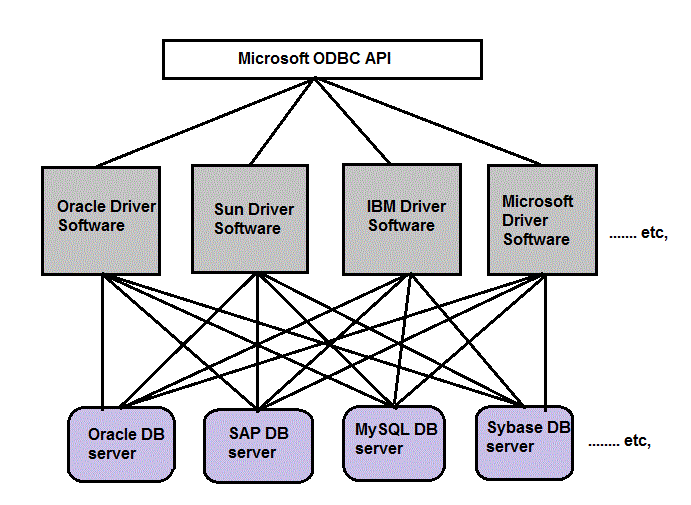
    To resolve this problem Microsoft introduced an API called "ODBC API". Using this API we can make a C program to communicate with any DB server. This API consists of the functions which can communicate with all the DB servers.  As Microsoft released an API any one can implement it. This implementation is known as "ODBC Driver Software". Once if any company released a Driver software, it can be used to communicate with any DB server.
    odbc
    Fig: ODBC API released by Microsoft, implemented by different companies and used to access any DB server. 

    Note: Another disadvantage of C program is that, it need more lines of code when compared to JDBC code. So, we prefer JDBC to C program.

    Finally, now let us know the definition of JDBC.

    JDBC Definition:

             JDBC is an API which is used to develop a java program that communicates with any Data Base server without changing the code.